The process of creating, testing, and releasing apps for Android devices is known as Android app development. Android apps are used by businesses to supply digital goods and services, automate processes, and increase client engagement. Kotlin, Android Studio, Jetpack Compose, APIs, and cloud technologies are frequently used in modern development.
Quick Answer
Planning, designing, creating, testing, and publishing Android apps is known as Android app development. These apps are usually created using Kotlin in Android Studio, with a layered architecture (UI, View Model, Repository, Data) using Jetpack Compose for the user interface. A mid-complexity app including authentication, APIs, and payments often takes three to five months; a huge, multi-role platform can take six to twelve months or more. A simple app typically takes six to ten weeks and one to two developers. Google’s Gemini in Android Studio (available in the current Otter/Quail release channels) is a common component of the workflow in 2026, but it supports development rather than taking the role of testing, architecture choices, or security reviews.
What Is Android App Development?
The process of developing software for Android-powered devices, which are mostly delivered via Google Play, is known as Android app development.
Almost all digital goods categories are covered by Android apps:
- E-commerce and marketplaces
- Banking and fintech
- Education and EdTech
- Healthcare and telemedicine
- Food delivery and logistics
- Travel and booking
- Social and community apps
- Business and field-operations tools
- Entertainment and streaming
- Productivity and utilities
Product planning, UI/UX design, backend and API integration, database design, security review, performance tuning, store submission, and continuing maintenance after launch are all necessary for a production-ready software in addition to developing code. Typical apps use APIs to communicate with a backend, store data locally and/or remotely, authenticate users, deliver push notifications, and, when permissions permit, access device hardware or sensors.
Key Takeaway
Android development encompasses more than just Kotlin syntax; it also involves engineering, design, backend architecture, security, quality assurance, and product strategy.
Why Android App Development Still Matters in 2026
Android today encompasses much more than just phones: the ecosystem includes tablets, foldables, ChromeOS desktops, vehicles (Android Auto), TVs, and XR devices. Because a significant portion of usage occurs outside of a typical phone screen, Google’s current app-quality guidelines specifically encourage developers to adopt flexible layouts rather than single-screen design.
That ecosystem continues to provide enterprises with tangible benefits:
1. A direct, owned channel to customers – Unlike a social platform or marketplace listing, accounts, personalization, push notifications, and support are all under your control in one location.
2. Faster, more focused interactions – A native app typically outperforms a mobile website in terms of speed and friction for repetitive actions (such as tracking a delivery, reordering, or checking a balance).
3. Access to device capabilities – Camera, location, biometrics, notifications, and background work, all of which are utilized with the proper APIs and permissions.
4. Internal tooling at scale – Instead of using modified consumer software, field service, inventory, delivery, and sales teams frequently use internally developed Android apps.
5. A product that can grow – As the user base and requirements expand, a targeted MVP can now add platforms, features, and integrations.
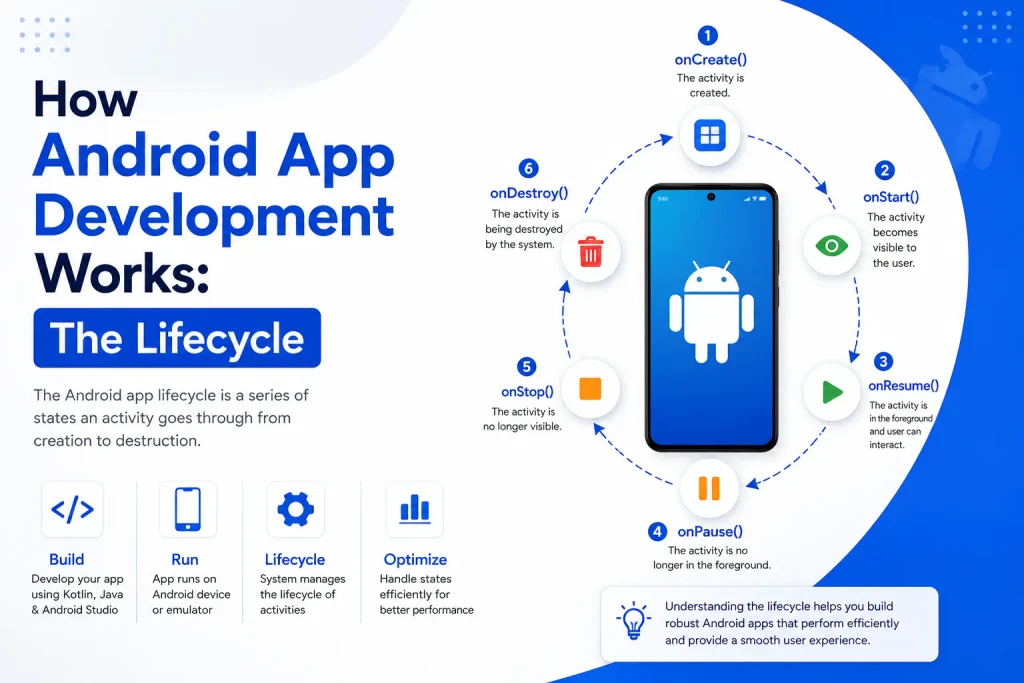
How Android App Development Works: The Lifecycle
| Step | Development Stage | What It Involves |
| Step 1 | Define the App Idea | Determine the app’s target market, the issue it addresses, its key features, and what sets it apart from other apps. |
| Step 2 | Define Requirements | Divide the requirements into non-functional aspects like performance, security, dependability, scalability, and accessibility and functional features like registration, login, search, payments, and notifications. |
| Step 3 | Design the UX | Before beginning major work, plan the visual design system, user flows, screens, components, and navigation. |
| Step 4 | Develop the Application | Construct the databases, APIs, business logic, data management, navigation, user interface, and necessary third-party connectors. |
| Step 5 | Test the Application | Test functionality, user interface, performance, compatibility, and security on both relevant physical Android devices and emulators. |
| Step 6 | Deploy the Application | Complete the necessary store assets and configurations, prepare the release build, and submit the application via Google Play or another approved distribution channel. |
| Step 7 | Maintain and Improve | Throughout the course of the application’s existence, release bug patches, security upgrades, compatibility enhancements, performance optimizations, and new features. |
The Android Development Stack in 2026
| Technology | Primary Purpose |
| Kotlin | Application programming language |
| Android Studio | Official IDE, now with Gemini built into the editor |
| Android SDK | Core Android APIs and dev tools |
| Jetpack Compose | Declarative, Kotlin-first UI toolkit |
| Jetpack Libraries | Navigation, Lifecycle, Room, WorkManager, etc. |
| Gradle | Build automation |
| Firebase | Backend-as-a-service (auth, database, messaging, analytics) |
| Room | Local database abstraction over SQLite |
| REST/GraphQL APIs | Client-server communication |
| Git | Version control |
A basic internal tool does not require the same architecture as a consumer marketplace app; instead, the appropriate stack is determined by the project’s requirements rather than by defaulting to whatever is most popular.
Step-by-Step: The Full Development Process
- Market and user research – Audience, rivals, price strategy, and platform considerations.
- Product requirements document – Objectives, features, user flows, and success indicators.
- Wireframes – low-fidelity navigation and screen.
- UI/UX design – components, responsive layouts, typography, and color schemes.
- Tech stack selection – Based on budget, team competence, performance requirements, and complexity.
- Project setup – The project template for Android Studio, Kotlin, and Compose can be scaffolded from a plain-language description using the New Project Assistant.
- Build the UI – Reusable composables and screens.
- Application logic – Error handling, navigation, validation, and state management.
- Connect APIs – maps, notifications, orders, payments, accounts, catalogs, and analytics.
- Data storage – Depending on offline requirements, it might be local (room), remote, or hybrid.
- Testing – Device-level, UI, unit, and integration.
- Performance optimization – Memory, rendering, network utilization, and startup time.
- Release prep – Signing, versioning, and storing assets and information.
- Publish – Submit via Google Play (or another method that is supported).
- Maintain – After launch, keep an eye on compatibility, performance, feedback, and crashes.
A Worked Example: Building a Simple Task Manager
- Screens: Dashboard, Task List, Add Task, Task Details, Profile, and Login
- UI: constructed with composables from Jetpack Compose
- State: Which jobs are available, which are chosen, and what the user recently completed
- Storage: local-first (Room) with a backend sync option
- Navigation: The back stack between destinations is managed by Android’s Navigation component.
- Testing: Rotation, different screen widths, adding, editing, and removing tasks, and offline behavior
- Release: Signed release build after testing is completed
Despite its small size, this example touches on all of the main areas of Android development, including UI, logic, storage, navigation, testing, and release engineering.
What Does Android App Development Cost?
Cost tracks scope rather than a constant per-app pricing, therefore there is no set amount.
| Cost Driver | Effect |
| Number of screens | More displays equals more design and development time. |
| UI/UX complexity | Real hours are added by custom or animated interfaces. |
| Backend | Infrastructure and APIs are frequently the biggest line items. |
| Authentication | Account/login systems expand beyond a simple form. |
| Payments | Not simply an SDK call, but integration, compliance, and testing |
| Third-party APIs | Payments, chat, maps, and other features increase development and continuing expenses. |
| Database complexity | The difference in effort between relational and simple key-value storage is substantial. |
| Admin panel | Essentially, a second application to develop |
| Device/QA coverage | More QA hours = a larger testing matrix |
| Security requirements | Review and controls are added to regulated data (health, financial). |
| Maintenance | Recurring expenses that continue after launch |
How Long Does It Take?
The number of features, screens, UI complexity, backend and API work, auth and payments, testing depth, third-party integrations, team size, and how much the scope changes mid-build all have an impact on timeline, just like cost does. What truly generates a trustworthy schedule is a well-defined feature list and technical specification, not a guess based solely on “simple app” vs. “complex app” labels.
Android Development Trends Worth Tracking in 2026
- AI-native tooling – With Agent Mode managing the build-deploy-verify loops, Gemini is now integrated directly into Android Studio’s editor and is no longer an experimental add-on. It is not a replacement for architecture or security evaluation, but rather an accelerator for engineers.
- Adaptive apps – Supporting foldables, tablets, PCs, and automobiles is becoming more than just a “nice to have” feature.
- Compose maturity – With continuous tooling and performance enhancements, Compose remains the standard for new UI work.
- On-device AI – Increasing support for running intelligence closer to the device, which can improve privacy and responsiveness for certain use cases.
- Performance engineering – Profiling-driven optimization-rather than guesswork-becomes increasingly important as programs become more sophisticated.
Common Android App Development Mistakes to Avoid
| Common Mistake | Why It Matters | Recommended Approach |
| Starting Without Clear Requirements | Changes in scope, redundant effort, and expensive rework can result from unclear requirements. | Prior to development, specify features, technical requirements, user needs, and commercial objectives. |
| Overlooking User Experience (UX) | Even a technically sound app may fail if its navigation is unclear or challenging to use. | Give user-centered design, simple interactions, accessible interfaces, and easy navigation top priority. |
| Designing for a Single Screen Size | On tablets, foldables, and other Android form factors, the interface might not function well. | Make use of layouts that are adaptable and responsive to various screen sizes and setups. |
| Delaying Testing Until the End | Late-stage testing can increase the difficulty and cost of fixing issues. | Throughout the development process, conduct ongoing unit, user interface, integration, compatibility, and performance testing. |
| Treating Security as an Afterthought | Accounts, data, APIs, and sensitive information can all be exposed by inadequate security procedures. | From the start, implement safe API communication, data security, rights control, and secure authentication. |
| Adding Too Many Features to V1 | Development time, complexity, and launch risk are all increased by having too many features. | Start with a targeted MVP and add more functionality in response to user input and corporate priorities. |
| Ignoring Performance Optimization | The user experience may be adversely affected by slow startup, excessive memory utilization, and ineffective rendering. | Optimize startup, memory, rendering, networking, and battery life by routinely measuring performance. |
| Neglecting Post-Launch Maintenance | Android devices, versions, dependencies, and security needs are always changing. | Schedule frequent updates, security enhancements, compatibility testing, problem corrections, and performance tracking. |
Frequently Asked Questions
What is Android app development?
The process of creating, developing, testing, delivering, and managing Android applications, ranging from a single screen to an entire platform with a backend.
Which language should I learn for Android development?
Kotlin. It is the primary language for new Android projects and the foundation of Jetpack Compose; Java is still useful mostly for codebases that already exist.
Is Android Studio free?
Yes, Android Studio is Google’s official free IDE for Android development, and it now comes with a free Gemini support tier.
What is Jetpack Compose?
The default option for new UI work is Google’s declarative, Kotlin-first UI toolkit for creating native Android interfaces.
Can a beginner realistically learn Android development?
Yes, begin with the basics of programming and Kotlin, create little apps in Android Studio, and gradually add knowledge of architecture, testing, and security instead of all at once.
What is an Android App Bundle (AAB)?
Google Play creates optimized, device-specific APKs from the single bundle you upload, which is the publishing format required for new apps.
How much does an Android app cost to build?
Screens, backend complexity, connectors, payments, and testing requirements are all largely dependent on scope. A true estimate requires a locked feature list.
How long does Android development take?
The same criteria that determine cost can take anything from a few weeks for a basic app to 6–12+ months for a large, multi-role platform.
Is Android development still worth learning in 2026?
Indeed. The workflow has been altered by Kotlin, Compose, and AI-assisted tools like Gemini in Android Studio, but the fundamental competencies of architecture, testing, security, and product thinking are more, not less, important.